|
Updating Large Datasets with Data Loaders |
|
It has to do with your QAD server settings, particularly -L progress server start up parameter, which controls the number of locks. The larger the –L number, the more records one can upload per batch. When a user hits the limit, the QAD server disconnects the Data Loader user and endsthe progress session. The user will receive a “time out” message. Technically, it’s a safe operation, but leaves user clueless since it does not provide much details what happens. It will be addressed in the future.
Increasing the -L value will consume a bit more server resources. In some cases, this can be a good solution, in others it will not be. Ask your data base administrator about increasing the –L value.
Keep in mind that the number of locks does not necessarily correspond to the number of records in the Data Loader spreadsheet. One spreadsheet record may correspond with many different records in the QAD database. For instance 1.10.1.1 QAD standard program updates many records in a several different tables at once for one spreadsheet record.
As general recommendation, when large updates need to be performed, we suggest you run them in hours when fewer users are logged in to QAD and fewer batch processes are running. This will allow more server resources to be allocated to Data Loader updates.
Workaround, using “chunks”:
You can work around the limitation issue by loading chunks of information at a time. For example, if you have 30K records in your spreadsheet but can only process 10K at a time, you can insert a blank row in row in row 10,000, and click upload. Only first 10K records will be uploaded. The program will stop at a blank row. Once the first 10K records are loaded, delete them from the spreadsheet and insert blank row again into row 10000 to upload the 2nd set of 10K and upload again.
Please also check this article for more information.
|
|
Switching off Security Alert Macro |
|
You can define Data Loaders as a trusted location in your Excel application. Here is how you can do this.
Alternatively, you may order code signing certificates from a 3rd party Certificate Authority company such as e-trust, Verisign or similar. We will add the certificate to your Data Loader templates.
|
|
Finding Errors on the spreadsheet |
|
Most Data Loaders are equipped with a “Find Error” button which is located at the top of the spreadsheet. If the “Find Error” button is missing, you can do the following:
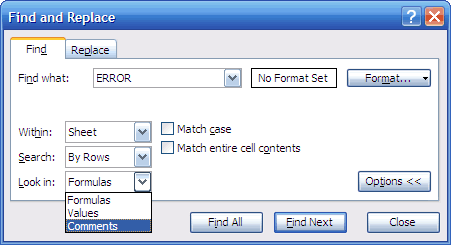
Use Find command CTRL-F. Type ERROR in the “Find What” field. Select Options, select “look in comments”, click on “Find All”. You will see an entire list of errors and will be able quickly navigate to them.
|
|
How to troubleshoot connectivity (Firewall) |
|
First, make sure jserv service is started on your QAD server.
Launch putty.exe on your Computer. Enter IP address of QAD host, jserv port# and connection type as shown below.
The port number is listed in the Data Loaders Excel template, alternatively check in mydb.ini file in $xld directory on QAD server.
Make sure the connection type is set to “RAW”.
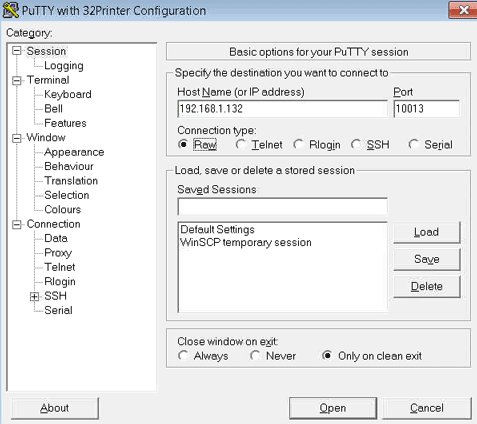
Click “Open” button.
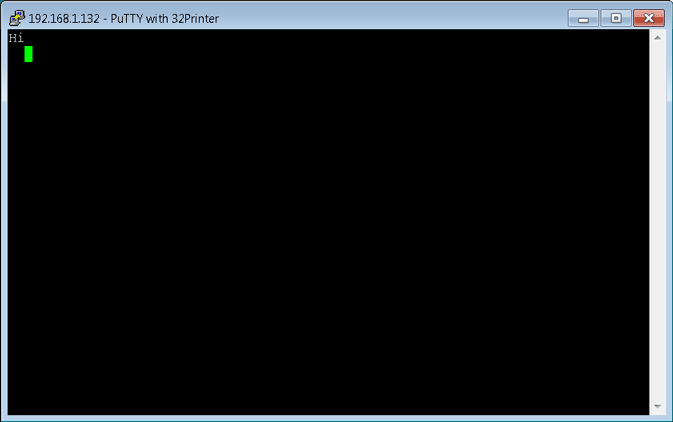
If Data Loaders are working correctly, you will see the screen below. If putty returns connection error, please check the firewall settings.
|
|
Managing databases in Data Loader templates |
|
Please read this article.
|
|
Deploying Data Loaders in corporate network |
|
There are a few options you can consider:
1) Use SharePoint to host Data Loaders. SharePoint gives you a benefit of content management. SharePoint not only prevents users from modifying copies of Data Loader templates, it also prevents users from replicating their own copies of templates elsewhere, helping to prevent any undesirable proliferation of the templates.
2) Deploy on QAD .NET user interface. Here is how you can do this.
3) Deploy on company’s intranet site. You may consider publishing Data Loaders on your company intranet site.
|
|
Installing Data Loader backend Progress program. Compiling Progress Programs to speed up Data Loader’s backend |
|
This article explains how.
|
|
Data Loader Internationalization |
|
This article explains how.
|
|
I am getting VBA Error in my template |
|
As general advice, we suggest that you discontinue using the template copy, which gives VBA errors permanently or occasionally, and replace it with the original template copy you received from 32 Soft. Please store the original templates on your network as read only files. Most likely, when the template was saved with the data in it or re-saved multiple times or sent via email, its macros could have been damaged some way. So the solution is to stop using that copy of the template, replace it with the original template you received from 32 Soft.
|
|
Can I delete records with Data Loaders? |
|
Data Loaders have been designed to easily and quickly create/update records massively in QAD using Excel templates. QAD users can use Effective Start and Expiry Dates to activate/deactivate records massively versus deletion. Most of our customers agree that this is safer way and gives their IT folks peace of mind. The deletion feature is disabled by default. If you understand the risk and still require deletion to be enabled, contact us.
If multiple people will be using Data Loaders at your company, it is possible to enable the delete function for certain users only.
|
|
Where can users specify the QAD domain in 32 Soft’s Data Loaders and can Data Loaders work with multiple domains? |
|
When a user opens any Data Loader and clicks on an action button that requires connection to the QAD database login, a window appears where the user is required to enter their QAD user id, password and domain. This information remains available for the duration of the Data Loader session. If a user wants to switch between domains, he/she can use the “Change Domain” button.
|
|
Are the displayed fields in 32 Soft’s Data Loaders configurable if the user is knowledgeable? |
|
Users cannot modify the layout of the Data Loaders for the tabs with action buttons, but can use formulas or references on these tabs. Users can also insert additional tabs that can be designed for the user’s requirements and will not have any formatting restrictions. There will not be any connection to QAD database from the tabs added by a user.
|
|
Can user-defined fields be added to 32 Soft’s Data Loaders and can the entered information in user-defined fields be uploaded to QAD? |
|
Yes, we can add user defined fields and incorporate them in almost any 32 Soft Data Loader.
|
|
Is it possible to add an additional descriptive field from another table to the download tab? |
|
Yes, descriptive fields can be added to any download tab, as long as the information to be displayed in those fields is stored either in QAD or another Excel or text file.
|